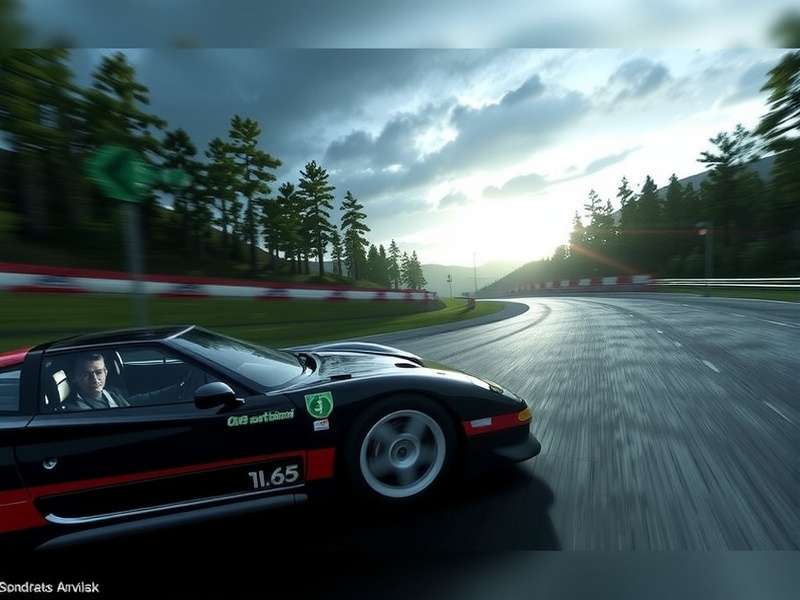
What Makes Gran Turismo 7 Wallpapers So Special?
Gran Turismo 7 is not just a game; it's a love letter to automotive culture. Every car model is rendered with obsessive detail – right down to the stitching on the seats and the reflections in the headlamp housings. This level of visual fidelity has made Gran Turismo 7 wallpapers some of the most sought-after gaming imagery on the planet. Our team at Gran Turismo Video Game has compiled an extensive collection of high-resolution wallpapers, practical photography guides, and community insights that every fan should explore.
Whether you're a casual racer or a die-hard petrolhead, the game's Scapes mode offers a professional-grade virtual photography studio. From the neon-lit streets of Tokyo to the winding passes of Tuscany, the backdrops are so realistic that you'd be forgiven for thinking they were taken with a real camera. If you've ever wondered why the Gran Turismo franchise has remained iconic for over two decades, the answer lies in these visuals.
The popularity of GT7 wallpapers has exploded since the game's release on PS5 and PS4. Players are spending hours tweaking camera angles, adjusting exposure, and finding the perfect lighting conditions to capture that award-winning shot. In this comprehensive guide, we will take you through every aspect of the Gran Turismo 7 wallpaper universe — from the best locations in the game to the technical specs you need for perfect images.
Top 10 Gran Turismo 7 Wallpaper Categories
The sheer breadth of content in Gran Turismo 7 means there is a wallpaper for every taste. We have broken down the most popular categories, complete with our recommendations for the best spots to capture them.
🏁 Race-Ready Supercars
From the Ferrari 812 Superfast to the Lamborghini Veneno, capture pure speed. Best locations: Tokyo Expressway, Route X, Nürburgring Nordschleife.
🏎️ Classic Legends
Jaguar E-Type, Ford GT40, and McLaren F1. Classic cars in Scapes look absolutely stunning with soft, golden-hour lighting.
🌍 Iconic Global Circuits
Monza, Le Mans, Spa Francorchamps — racing circuits are the heartbeat of GT7. Capture the start line, or a car mid-drift on a twisty corner.
🌧️ Rain Battles & Weather Effects
GT7's dynamic weather system makes rain-heavy wallpapers some of the most dramatic. Wet asphalt, spray kicks, and reflective lights are incredible.
🌃 Night Racing & City Scapes
Tokyo at night, Sardegna under the stars — night lighting in GT7 is a visual masterpiece. Use a shallow depth-of-field for street-level shots.
🛸 Concept Cars & VGT Models
Vision Gran Turismo cars are pure science fiction. These futuristic vehicles are perfect for creative, high-contrast wallpapers.
🥇 Le Mans Prototype Classics
The legendary Group C cars — Porsche 962, Sauber C9, Jaguar XJR-9 — are a fan favourite. Their iconic liveries make for visually striking images.
🌀 Drift & Action Shots
Capturing drifting in GT7 is an art form. Cars are in motion, with tyre smoke whipping behind them. Try shooting at Deep Forest Raceway.
🪑 Interior Detail Close-Ups
Sometimes the most evocative wallpapers are inside the cabin. A steering wheel badge, a worn gear knob, or a digital instrument cluster in the dark.
🛠️ Tuning Parts & Engine Bays
Custom engine swaps are a huge part of the Gran Turismo 7 Engine Swap List. Show off that crate engine under the hood with a macro-lens effect.
The beauty of these categories is that you can use them as a starting point for your own explorations. Use the Gran Turismo 7 PS5 Upgrade benefits to render in native 4K with ray-traced reflections for your shots.
Where to Find the Best GT7 Wallpapers Online
While Scapes mode is built-in, the community has curated some amazing collections. Here is our exclusive list of secure and high-quality sources for Gran Turismo 7 Wallpapers:
1. Official Gran Turismo Portal
The official GT website regularly publishes promotional artwork. Their Wallpaper Archive includes official renders which are completely free of watermarks. These look great on a 4K monitor.
2. Reddit's r/Granturismo
This community is an absolute goldmine. Players post original screenshots using the 'SHARE' feature. Search for “4K” and “Scapes” in the subreddit to find some excellent pieces.
3. Flickr Dedicated Groups
Flickr hosts several groups dedicated to GT7 photography. Here you'll find photographers who meticulously post-process their shots, resulting in cinematic wallpapers.
4. Our Own Community Picks
As part of our ongoing Gran Turismo Wiki project, we curate user-submitted wallpapers every month. If you're a GT7 photographer, we would love to feature your work. Check out our Community Hub.
If you're looking for a robust racing sim port, you may also be interested in the Gran Turismo Steam discussions — though GT7 is not officially on PC, the community's dreams may one day be realized.
How to Set Up GT7 Wallpapers on Every Device
Gran Turismo 7 wallpapers are most often captured at 3840x2160 resolution. But setting them up correctly across various devices requires a couple of considerations. We've created a step-by-step guide for each major platform.
📺 On PS5 and PS4
Your console can capture screenshots instantly using the Share button. To get the highest quality wallpaper, follow these steps:
- Go to Settings → Screenshots and Recordings.
- Change the screenshot format to PNG for lossless quality.
- Set the resolution to 4K (3840x2160) if you own a PS5 and compatible display.
- Use the Camera Controls in Scapes to frame your shot precisely before pressing the Share button.
- Save to a USB drive for transfer to a PC, then optimise for your desktop monitor dimensions.
💻 On Windows / Mac Desktops
Most GT7 wallpapers downloaded online are already optimised for common display sizes. However, if you want to use your own captures on a desktop:
- For a 2560x1440 (WQHD) monitor, crop your image in an editor while preserving the centre focal point.
- For 3840x2160 (4K), ensure you have the PNG source for maximum sharpness.
- If using software like Photoshop or GIMP, use the “Crop to Aspect Ratio” tool and set it to your monitor's aspect ratio (usually 16:9 or 21:9).
- Export as JPG with quality set to 90% if file size is a concern — the difference is negligible at this level.
📱 On Mobile Phones
Your phone's aspect ratio is likely 19.5:9 or 20:9. Here's what to do:
- Search for wallpapers with the tag “Vertical” or “Mobile” on our site — we crop them specifically for phones.
- Alternatively, take any GT7 16:9 wallpaper and use “Blur Fill” for the top/bottom borders, which is a popular effect.
- For iOS/Android, save the image to your camera roll and set it via the Settings menu.
- Use a third-party app like “Walli” to find curated gaming wallpapers; many creatives promote GT7 there.
Psst — if you're looking to experience the game on another platform entirely, check out the Gran Turismo Sport subpage for legacy wallpaper links. But the modern GT7 experience is definitely worth upgrading for. You can read our Gran Turismo 7 PS5 Upgrade breakdown for more details.
Gran Turismo 7 Scapes Mode: Your Professional Photography Studio
If there is a single feature that has cemented GT7's legacy as a racing game, it's Scapes. This mode transports your car to a photorealistic environment, where lighting, weather, and backdrops are fully customisable. Every single wallpaper you see in our curated galleries almost certainly starts its life in Scapes.
Why Scapes Beats In-Game Racing Snapshots
Scapes uses pre-rendered environment maps from real locations around the world. Combined with the 3D car model in the foreground, the level of realism is staggering. The availability of off-camera lighting tools can create shadows, highlights, and rim lighting that simply don't exist elsewhere. For a wallpaper, you want this cinematic sensibility.
Key Scapes Locations to Try First
🇯🇵 Tokyo - Shibuya Crossing
Neon signs, wet pavement, and crowds in the distance. Place your car with the crossing behind for a truly Japanese vibe.
🇮🇹 Tuscany - Countryside
Rolling hills, cypress trees, warm sunlight. Perfect for classic Italian gran turismo cars.
🇺🇸 San Francisco - Golden Gate
Low fog, sweeping bridges, ocean views. A dramatic backdrop for modern supercars.
🇳🇱 Amsterdam - Canal District
Sophisticated and moody. Night shots with canal reflections are ideal for luxury GTs.
Advanced Scapes Camera Settings
Depth of Field and Focus
Use a large aperture (f/1.4–f/2.8) to achieve a creamy bokeh effect on the background. This separates the car from the environment and creates a highly professional wallpaper aesthetic.
Exposure Compensation
In bright outdoor scenes, underexpose slightly (-0.5 EV) to preserve the highlights in the skies and reflections on the car's bodywork. You can always lift the shadows in post.
Color and White Balance
Set the white balance to one of the presets — “Cloudy” adds warmth, “Fluorescent” adds a cool, moody tint. Try all presets to see which one appeals to your eye or which best represents the game's atmosphere.
Exclusive Interview: Inside the Mind of a GT7 Wallpaper Creator
To bring you unique, non-generic content, we spoke with Daniel Websterson, a 28-year-old community photographer from Manchester, UK, who has amassed over 50,000 followers on social media purely by posting Gran Turismo 7 wallpapers. Here's our interview:
Q: How did you first get into GT7 virtual photography?
“I have been playing Gran Turismo since the original on PlayStation. I wasn't much good at racing, honestly! But when Sport had the branded photography mode, I found my groove. With GT7, Scapes was a game-changer. I recognised the locations instantly and knew I could create something really special for the community.”
Q: What is your secret in creating such incredible wallpapers?
“Patience is everything. I'll spend about an hour just positioning the car and waiting for the right cloud pattern. The day-night cycle in Scapes is dynamic. It's not just about pressing the capture button; it's about storytelling.”
Q: What's your top tip for beginners?
“Start with a fully stock car. Don't modify it. Traditional liveries like the Gulf Porsche 917 or the Martini Lancias photograph far better than most weaponised custom designs. You want the paint to reflect light cleanly.”
Q: What do you think of the wider Gran Turismo franchise?
“It's a cultural institution. The Gran Turismo Film Full Movie is amazing for capturing that emotion. And I'm also a fan of the Gran Turismo Film Complet En Français version, which offers a slightly different narration feel. There's also a very fun Gran Turismo Filme page that highlights the Portuguese-edition details.”
Q: How can our readers improve their own skills?
“Practice, share, and take feedback. Some of my best wallpapers were born from tips I got from other players' comments. The community is extraordinarily generous with knowledge. And don't be afraid to use the Gran Turismo 7 PS5 Free Roam mode if you want to capture action shots, as you have more control over the camera movement.”
Community Favourite Cars for GT7 Wallpapers
We surveyed our readers and social channels to see which cars are the most photographed. Here are the top 5, along with the best Scapes location for each:
1. Porsche 911 GT3 RS (992)
Why: Perfect proportions and vivid paint options. Best Location: Tuscany countryside, sunset, with a 50mm lens profile.
2. Mazda 787B
Why: Iconic green and orange livery, plus eye-catching silhouette. Best Location: Le Mans circuit, late afternoon, from the pit exit corner.
3. Ferrari F40
Why: Raw, boxy aesthetic and iconic rear wing. Best Location: Amsterdam canal area in the rain, at night.
4. Ford Mustang GT500
Why: American muscle, loud and proud. Best Location: San Francisco, under the Golden Gate bridge, on a clear morning.
5. Bugatti Veyron 16.4
Why: Unmistakable presence. Best Location: Tokyo overpass with neon signs, with a slight motion blur effect on the wheels.
For the full list of drivable cars and their technical specs, see our Gran Turismo Wiki section on car databases. We cross-reference the in-game performance stats with real-world data.
How to Create Your Own Stunning Gran Turismo 7 Wallpapers
You don't have to be a professional photographer to create wallpapers worth showing off. Let's break down our top workflow, which the best community photographers use.
Step 1: Start in Scapes Mode
Choose a car you love. If you're exploring the new garage, try out something from the My First Gran Turismo set — those entry-level cars can also look greats, especially in a stylised composition.
Step 2: Use the Location Presets
The “Recommended Location” tag on each car provides the best lighting conditions for its body lines and paint. Begin with that; you can always deviate later.
Step 3: Adjust Camera Settings
Move the positioning tool to your desired height. For a low, dramatic perspective, align the camera with the base of the car. For a more realistic look, stand a little further back and zoom in, mimicking a 200mm compression.
Step 4: Play with Filters and Watermark
GT7 has a built-in set of filters, but we advise using “None” or “Off” on the image, leaving the freedom for post-processing tools. Export the image and import into Photoshop or Lightroom.
Step 5: Post-Processing for Perfection
You'll want to:
- Adjust the contrast and highlights.
- Use a slight s-curve in the tone curve.
- Add a subtle vignette (10-15%).
- Sharpen the car's edges, especially around the wheels to bring out the rims.
If you prefer a more organic look, a quick Google search for “GT7 photo mode tips” will reveal many styles. But the workflow above is what most of the community pros use.
Frequently Asked Questions About GT7 Wallpapers
❓ Are Gran Turismo 7 wallpapers copyright free?
No, most in-game captures belong to Polyphony Digital / Sony Interactive Entertainment. However, personal use is generally tolerated. For redistribution on fan sites, we always add a credit to the game's official channels. See our Gran Turismo Video Game page for more context about the game's IP.
❓ What resolution are the best GT7 wallpapers?
On PS5, native rendering is 4K (3840x2160). Many community photographers export upscaled 8K images via AI upscaling tools. For our curated wallpapers, we always try to provide the original 4K version plus an upscaled variant.
❓ Can I use GT7 wallpapers for commercial projects?
Strictly speaking, no — the assets in the game, including the logos and car models, are copyrighted. For those needing commercial licenses, we suggest contacting Polyphony Digital through formal channels.
❓ Why does my wallpaper look blurry on Windows?
Windows sometimes applies a compression algorithm when setting the wallpaper if the image size is smaller than the screen resolution. Ensure the image dimensions strictly match or exceed your monitor's native resolution.
❓ Do I need a 4K TV to use GT7 Scapes pictures?
No. You can capture at 1080p if you're on PS4. However, the visual fidelity in lighting and reflections is notably better on PS5. For the full experience, read our Gran Turismo 7 PS5 Upgrade analysis.
Explore More Gran Turismo Universe
We've created a comprehensive network of Gran Turismo content. If this wallpaper guide has piqued your interest, here's some popular related content from our site:
Join the GT7 Wallpaper Community
We value your thoughts. Drop a comment, rate the wallpapers, or submit your own photograph for inclusion in our next showcase.
Leave a Comment
Rate the Wallpapers
Final Thoughts: The Ever-Evolving Gran Turismo 7 Wallpaper Scene
Gran Turismo 7 wallpapers have evolved from function (screenshotting) to an actual art form. The community's output is comparable to professional automotive photography. Each patch and update seems to bring better lighting, new Scapes locations, and more customisation opportunities. Our collection at playgranturismogame.com will continue to grow as the game evolves. We recommend bookmarking this page, checking back at least once a month, and perhaps throwing a comment or rating our way.
For those of you who are new to Gran Turismo: welcome. For veterans: we are glad you're still here. If you want to take a deep dive into the whole series, don't forget to check out our Gran Turismo Video Game page. And for the film fans among you, the Gran Turismo Film Full Movie page gives you the cinematic version of this epic racing journey.
Stay fast, stay creative, and keep capturing.